ALWAYS CREATING
MUSE is a mobile app and responsive website designed to help people discover museums, exhibitions, and cultural events while creating opportunities to connect through shared interests.
The Challenge:
Role
UX/UI Designer
Timeline
December 2025 - July 2026
Tools
Figma
Focus
Research
IA
Prototyping
Usability Testing
Visual Design

The GOAL:
Museum information, events, and ticketing are often spread across multiple websites, making discovery and planning feel fragmented. MUSE explores how one platform could make cultural experiences easier to find, plan, and share.
Create a more approachable way to discover museums and events while encouraging connection through shared cultural interests.
research & discovery
MUSE began with secondary research, demographic data, competitive analysis, and observations about how museums are currently marketed. I noticed that cultural experiences often gain visibility only after becoming popular online, which led me to explore how discovery could feel more centralized, approachable, and social.

Fragmented Discovery
Users often need to search multiple websites to find events.
Limited
Exploration
Events and exhibits can be difficult to discover unless users already know what they are looking for.
Social
Hesitation
Attending an unfamiliar event alone can create uncertainty.
Planning
Friction
Visit information, tickets, and event details can feel scattered.

Designing for the user
Keiran is an active college student looking for an easier way to discover museums and events in a new city while meeting people with similar interests.
Designing for Keiran helped me continually evaluate whether every feature encouraged exploration while reducing uncertainty.
Mapping Keiran's journey allowed me to better understand not only what he was trying to accomplish but recognize moments of excitement, uncertainty, and hesitation.
Understanding the why behind each step became the driving force behind design decisions made throughout MUSE.
from ideas to structure
I explored several homepage layouts on paper before moving into digital wireframes. Comparing multiple directions helped me think through the flow of each layout and decide what navigation would feel effortless from the first screen.

Homepage
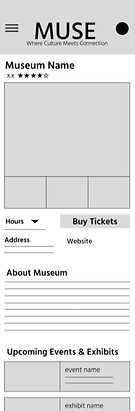
Museum + Event Pages
Organized content into distinct categories following a similar layout style for each section.
Used consistent page structures and prioritized essential details above the fold so users could quickly understand where they were, what was happening, and what action to take.


Booking
Kept dates, ticket types, and pricing together to make the booking process feel straightforward and transparent.

usability testing
I conducted two usability rounds with one participant in each round. The first informed the transition from wireframes to low-fidelity prototypes and mockups while the second helped identify areas of the high-fidelity prototype that needed refinement.
Navigation
Users needed an easier way to move backward through museum, event, and booking flows.
Personalization
Users wanted more filters and recommendations.
Convenience
Users wanted important information to be easier to access and tickets to integrate with digital wallets.
iterating the experience


Homepage
Before: Repetitive layout with little distinction between categories
After: "Recommended for You" section + varied tile sizes for clearer visual hierarchy and personalization
Museum Ticket Selection
Before: Small +/- controls + inability to freely move backwards
After: Larger dropdown selectors that improved usability and reduced visual clutter + back button to create a smoother flow through pages


final experience
The final experience brings discovery, event planning, ticketing, and social connection into one cohesive system.


**MUSE is a conceptual project completed for the Google UX Design Certificate.